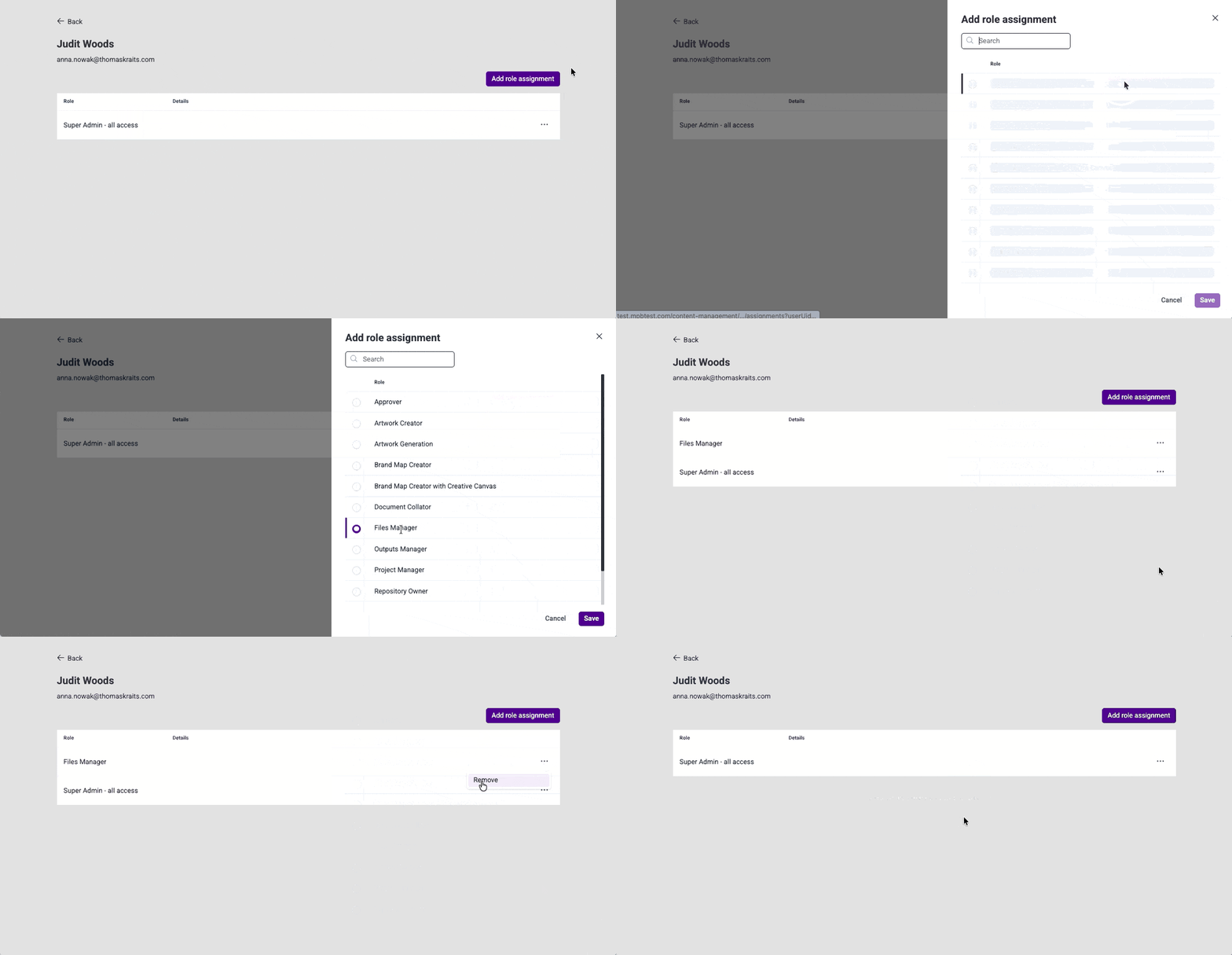
Files Manager role (#85443) A new Files Manager role has been introduced. Users assigned this role are granted write access to the Files module. For now, this includes the ability to edit Global Property values for files. The role can be assigned and unassigned from users, and its permissions are also included for Super Admins.
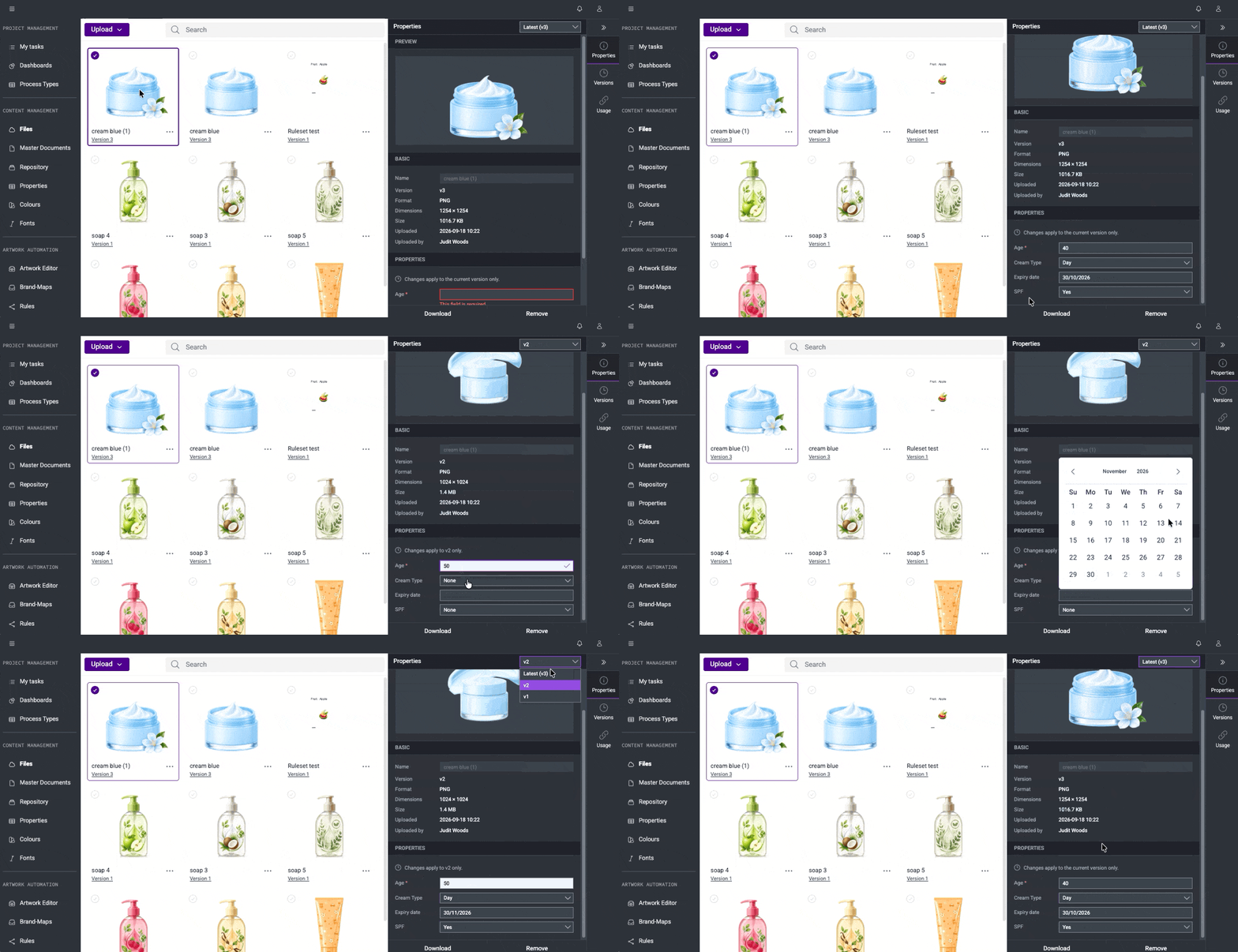
Version-specific file properties (#71282) Global Properties can now be assigned to individual file versions in the Files module. Each version can have its own property values, and users can manage them the same way as in other parts of the system - such as Projects or Repository. A version selector in the Properties tile allows switching between versions to view or edit the properties associated with each one.
UI Improvements
This release continues the ongoing effort to improve the consistency and usability of the Content Management platform.
My Tasks
#83252 - The "My Tasks" label has been updated to use consistent capitalisation across the navigation menu, page header, and browser tab title.
Properties
#83259 - The column order in the Properties module has been updated improving clarity and consistency with other parts of the application.
Master Document
#83278 - The Master Document Details page has been redesigned to improve usability and make better use of available screen space. Navigation, primary actions, bulk actions, and the content table are now better organised. Improvements to the mobile view and document description area are planned for next release.
Content Managment
#83253 - The drag and drop handle icon in tables and side panels has been resized to match the filter and settings buttons, ensuring a consistent toolbar appearance across the application.
#83258 - Image thumbnails and "No preview" placeholders in tables are now aligned and sized consistently with other content items. This release focuses on the Master Document and Repository views - further improvements are planned for the next release.
#83260 - Action menus across multiple modules - have been reorganised and relabelled for consistency. Further unification across remaining areas is planned for the next release.
Bug Fixes
This release brings several improvements to stability and day-to-day usability.
Files
#80915: Fixed an issue where the Upload button was visible and accessible to users without the required upload permission - the button is now hidden for users who do not have the necessary access.
Repository & Master Documents
#63640: Fixed an issue where Content Elements imported from Excel files did not appear in the Repository after a successful import - imported content is now visible immediately after the import completes.
#74417: Fixed an issue where searching by file name or file extension in the filter did not highlight the matched term on graphic Content Elements - matched terms are now highlighted consistently across all types.
#82250: Fixed an issue where applying a filter and then creating a new Content Element caused the table to reset to an unfiltered view - active filters are now correctly maintained after the table refreshes.
#82251: Fixed an issue where long text of Content Element in the version side panel in Master Document details was not fully visible and caused unexpected horizontal and vertical scrollbars to appear - text now wraps correctly and the panel displays without unwanted scrollbars.
#82745: Fixed an issue where committing an AI-generated translation saved it as a draft instead of a committed version - AI-generated translations are now saved with the correct status when the commit action is used.