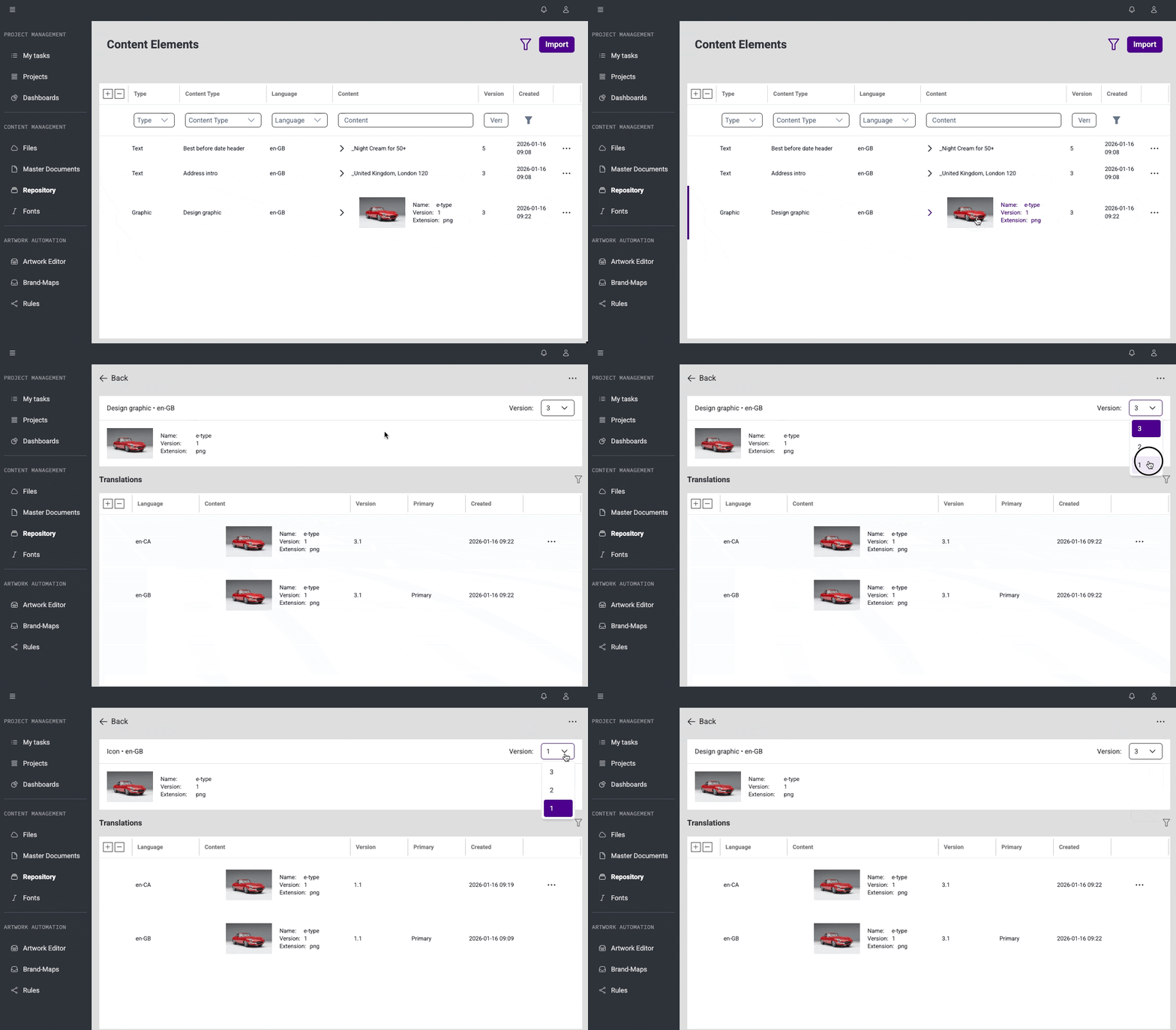
Content Element previews and version switching (#45392, #45391)
We added a preview panel on Content Element details where translations are presented. It display the loaded Content Element details, including content type, locale, and text content or a graphic thumbnail. There is also a version dropdown so user can switch between Content Element versions and view translations related to the selected version without navigating back to the main list.
Bug Fixes
This release brings several improvements to stability and day-to-day usability.
Brand Maps & Artworks
#45512: Fixed an issue where numeric variables could not be edited with decimal values in the configuration view. Numeric fields now accept decimal separators correctly, making values consistent across editing and preview.
#45514: Resolved a problem where numeric values were automatically displayed with separators in preview. Numbers are now shown exactly as entered, ensuring clear and predictable editing.
Repository
#45406: Fixed an issue where content elements with multiple versions were expanded by default. These elements are now collapsed initially for a cleaner and more manageable list view.
Master Document
#45425: On the Master Document details view, corrected the sorting so translation languages are now displayed alphabetically from A to Z, instead of being ordered inconsistently.
#45587: On the Master Documents list, resolved a problem where searched text was not visually highlighted. Search results are now clearly highlighted to improve readability and navigation.